What a user journey map tells us #
Nielsen Norman Group defines a journey map as a visualisation of the process a person follows to achieve a goal. It begins with the user’s actions on a timeline. Adding thoughts and feelings turns that timeline into a narrative.
“User journey map” and “customer journey map” are often used interchangeably. The same source notes that agreeing on the content matters more than the name. In enterprise software, however, the buyer and user may be different people, making the distinction useful.
A map can describe a website, mobile app or physical service. It is most useful for processes spanning several steps and channels, such as researching and buying a product, opening and first using an account, or resolving a support request.
The 5 core components #
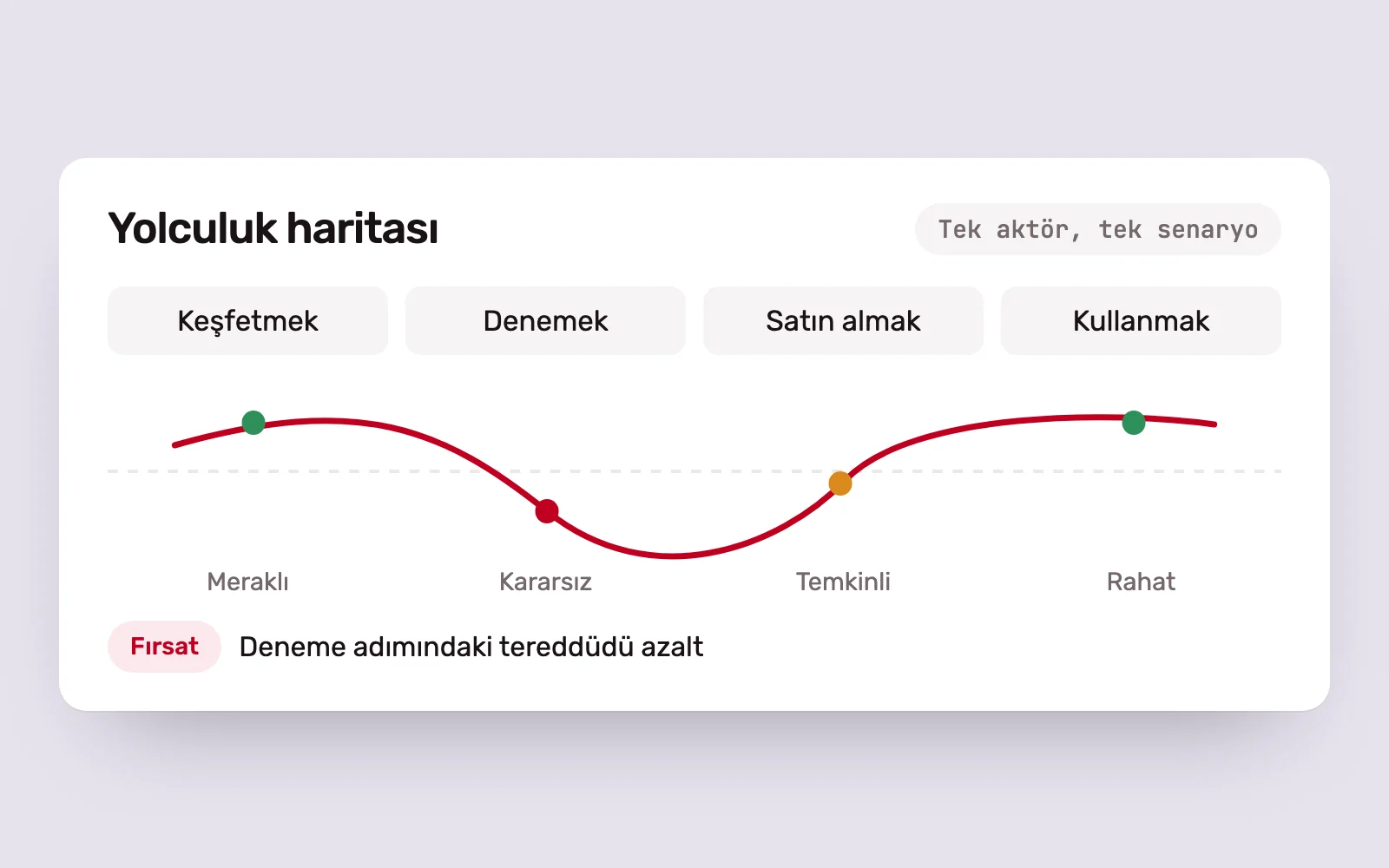
Journey maps can look different, but most well-constructed maps share five components:
- The actor defines whose perspective the map takes. Usually a persona, each map should represent one viewpoint. A university would need separate maps for students and lecturers.
- The scenario and expectations describe the actor’s goal and what they expect from the process. Someone switching to a more suitable mobile plan expects to find the information needed to decide easily.
- Journey phases are the high-level steps. In e-commerce, these might be discovering, trying, buying, using and getting support.
- Actions, thoughts and emotions show what users do, think and feel at each stage.
- Opportunities bring together insights, areas for improvement and their owners within the organisation.
The fifth component is often overlooked. Yet a map only moves beyond the meeting room and into the product when opportunities become concrete tasks with accountable owners.
When it helps #
Journey maps can serve two purposes, and the purpose changes their content.
- A current-state map shows how people interact with the product today. It identifies difficult moments, recurring complaints and breaks between channels.
- A future-state map describes the intended experience for a new or redesigned product. It aligns the team, stakeholders and investors around a shared goal.
Maps are usually created during discovery and requirements definition at the start of a project. Findings inform information architecture, screen flows and priorities. Later, the map can be revisited to examine a particular flow in detail.
It is useful for managers too. Putting steps owned by different departments on one timeline lets everyone see gaps between marketing and support, or sales and product.
Building it step by step #
- Define the scope. State the user, scenario and business question the map will address.
- Gather existing knowledge. Bring together analytics, support records, sales notes and previous research.
- Talk to users. Test assumptions through interviews or observation.
- Choose the actor. Use your primary persona if one exists; otherwise, create a brief user profile from the research.
- Outline the stages. Follow the user’s progress towards their goal, not the organisation’s internal process.
- Complete each stage. Record actions, thoughts and feelings in users’ own words wherever possible.
- Assign opportunities and owners. Give each opportunity a responsible person and a next step.
- Share and update. The map is a living document that becomes outdated as the product changes.
You do not need an expensive tool. Sticky notes on a wall or shared whiteboards such as FigJam and Miro are enough for the first draft. Building it with people from product, marketing, support and development makes it easier for them to adopt it later. The final map should be readable at a glance; detailed notes and interview quotes can sit in an appendix.
Questions to ask at every stage #
We use context, progress, device, function and emotion as a checklist. At each stage, we ask:
- Where is the user, what surrounds them and what might distract them?
- How does this stage lead to the next, and where do users get stuck?
- Which device are they using, and how familiar are they with it?
- What function do they expect here, and can they reach it easily?
- How do they feel: comfortable, bored or anxious?
The emotion row can be the most revealing part of the map. Anxiety often peaks at payment, personal data entry or unexpected errors. These moments show the design team where to focus.
Common mistakes and related methods #
- Building the map entirely from team assumptions. An assumption-based draft is a reasonable start, but should not guide decisions until validated through research.
- Combining several users in one map. The narrative becomes unclear, as does whose problem you are solving.
- Structuring the map around departments. Users do not see your internal organisation.
- Leaving opportunities without owners. Insights without owners rarely become action.
Journey mapping is one of several related methods. Nielsen Norman Group’s comparison explains that empathy maps, journey maps, experience maps and service blueprints describe different processes and serve different purposes, while all building shared understanding. Use a service blueprint to examine the backstage processes supporting users, or an experience map to understand behaviour beyond a specific product.
At Pars Design, we usually build journey maps from analytics and user interviews when assessing an existing product. The map helps us decide with the team which screens or flows to address first.
Sources #
- Journey Mapping 101, Nielsen Norman Group; definition and five core components of a journey map
- Customer Journey Maps: When and How to Create Them, Nielsen Norman Group; when and how to create the map
- UX Mapping Methods Compared: A Cheat Sheet, Nielsen Norman Group; comparison with empathy maps, experience maps and service blueprints